
The tools to automate the work of data engineering, statistical analysis, and narrative reporting already exist. They are not in preview. They are not behind a waitlist. They are open source, available today, and they run inside a Databricks notebook.
The technology is not the bottleneck. The bottleneck is organizational. Most enterprises have security and governance requirements that make it difficult to grant autonomous agents read/write access to a datalake, even in a sandboxed environment. That gap between what is technically possible and what is organizationally permitted is where most of the wasted time in data science lives today.
This article is the public launch of versifai-data-agents, an open source Python library that automates the full data science workflow inside Databricks. It covers what the library does, how it works, and where the real friction is in adopting it.
The ratio nobody talks about
Ask any data scientist what percent of their week is actual analysis versus getting data ready to analyze. The answer varies, but it always points in the same direction. Most of the time goes to things that are not the science.
Finding the right files. Writing ingestion scripts. Figuring out why the schema changed between the 2023 and 2024 data release. Dealing with nulls in columns that shouldn't have nulls. Loading everything to a catalog table and then discovering the join key is formatted differently across years. Then doing the whole thing again for the next dataset.
By the time the data is actually ready, the window for thorough analysis has shrunk. So the analysis gets compressed. And the narrative, the thing that someone in leadership actually needs to read and make decisions from, gets compressed even more. Three weeks of data engineering turns into a slide deck with four bullet points and a bar chart. The data had more to say. There just wasn't enough time to surface it.
This is the problem versifai-data-agents is built for. Agents handle the mechanical parts of the workflow so that researchers can focus on the parts that require human judgment: research design, interpretation, and editorial oversight.
Three agents, one pipeline
The library ships three agents. Each one handles a different phase of the research workflow. They run in sequence by default, but you can run any of them independently, resume from a checkpoint, or re-run specific sections without starting over.
The pipeline looks like this:
- Raw Files - ZIPs, CSVs, TSVs sitting in a Databricks Volume
- DataEngineerAgent - Discovers files, profiles data, designs schemas, loads to catalog
- DataScientistAgent - Builds silver datasets, runs statistical analysis, validates findings
- StoryTellerAgent - Writes an evidence-grounded narrative with citations back to the data
- Published Report - Fully reproducible, end-to-end traceable output
The data flows through a medallion architecture. Bronze layer is the ingested source tables in Unity Catalog. Silver layer is the joined, analysis-ready datasets. Gold layer is the findings, charts, and final outputs. If you are already using Databricks, this is the standard lakehouse pattern. Nothing custom.
Each agent uses a ReAct loop internally. That stands for Reason, Act, Observe. The agent decides what to do next, calls a tool, reads the result, updates its reasoning, and repeats until the phase is complete. This is the same general pattern used in most modern agentic frameworks. The difference here is that the tools are purpose-built for the data lifecycle, and the entire system runs inside your existing Databricks environment. No new infrastructure. No separate cluster. Just the notebook.
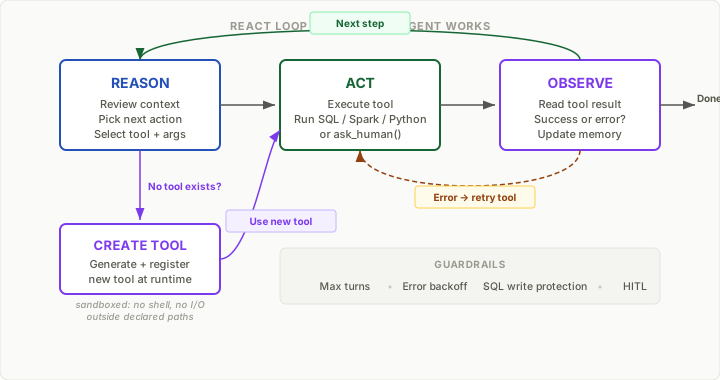
The ReAct pattern also means agents can recover from unexpected situations mid-run. If a file has unexpected encoding, or a schema design needs revision after profiling reveals something new, or a statistical test fails a confounder check, the agent adapts rather than crashing. When no existing tool can handle a novel situation, the agent creates one at runtime, registers it, and uses it for the remainder of the run. This matters because real data is messy. No ingestion script written upfront survives contact with a real dataset fully intact, and no pre-built tool library covers every edge case.
Agent 1: The data engineer
The DataEngineerAgent handles everything between raw source files and a clean, registered Delta table in Unity Catalog. That sounds straightforward until you have done it a few dozen times and know how many decisions are actually involved.
If you are already working in a Databricks notebook, setup is two steps: install the library and point the agent at a Volume path where raw files live.
# In your Databricks notebook
%pip install versifai
from versifai.data_agents import DataEngineerAgent, ProjectConfig

cfg = ProjectConfig(
    name="CMS Stars Analysis",
    catalog="healthcare",
    schema="cms_stars",
    volume_path="/Volumes/healthcare/cms_stars/raw_data",
)

agent = DataEngineerAgent(cfg=cfg, dbutils=dbutils)
result = agent.run()

print(f"Processed {result['sources_completed']} sources")
The agent requires an LLM API key, set as an environment variable or stored in a Databricks secret. It defaults to Claude but supports any LiteLLM-compatible model, including GPT-4o, Azure OpenAI, and Gemini.
import os
os.environ["ANTHROPIC_API_KEY"] = dbutils.secrets.get("my-scope", "anthropic-key")

# Or for Azure OpenAI:
# os.environ["AZURE_API_KEY"] = dbutils.secrets.get("my-scope", "azure-key")
# agent._llm = LLMClient(model="azure/gpt-4o", api_base="https://...")
Below is a recording of the DataEngineerAgent processing raw zip files into Unity Catalog tables.
The agent scans the Volume, finds source files, and profiles them individually. It reads the data, counts rows and columns, checks null rates, detects type mismatches, identifies duplicate columns, and flags ambiguities. It then proposes a schema, transforms the data, and loads it into Unity Catalog as a Delta table with lineage metadata.
Below is the catalog creation step, where the agent registers the processed tables.
When the agent encounters genuine ambiguity, it pauses and asks for human input rather than guessing. Every agent has access to an ask_human() tool for this purpose. In the CMS example, the agent found a column where values included "HMO", "PPO", and "22". Is "22" a valid CMS legacy code or a data entry error? The agent asked. I told it "22" is the legacy code for PFFS, and it continued.
After each completed source file, state is persisted to disk. If your notebook cluster gets recycled after processing 8 of 11 files, re-running the cell picks up at file 9. For long ingestion jobs this is not optional. Cluster auto-termination is a fact of life, and restarting a multi-hour run from the beginning is not acceptable.
Dynamic tool creation
This is the feature that matters most in production usage and is easiest to overlook in a demo.
No pre-built tool library can cover every scenario a data engineer will encounter. A government data file might use FIPS codes where your catalog uses county names. A vendor extract might have a date format that no standard parser handles. A join might require domain-specific logic that is not captured in any schema documentation.
When the agent hits one of these situations, it can write and register a new tool at runtime. That tool becomes available for the rest of the run. The tool creation is sandboxed: no shell access, no file I/O outside declared paths, no Spark writes outside the declared schema.
It is not possible to create tools ahead of time for every scenario these agents will encounter. The data world is too varied, the quirks too specific. If you try to pre-build every tool, you will spend more time writing tool wrappers than you would have spent doing the data engineering manually. Dynamic tool creation is what separates a library that works on demo data from a library that works on production data.
This does mean the agent generates and executes code at runtime, which has implications for security posture. More on that below.
Agent 2: The data scientist
Once the bronze tables are in Unity Catalog, the DataScientistAgent takes over. You provide a catalog, schema, output path, and a list of research themes. Each theme is a question paired with the relevant tables and context.
from versifai.science_agents import DataScientistAgent, ResearchConfig

cfg = ResearchConfig(
    name="CMS Stars Geographic Analysis",
    catalog="healthcare",
    schema="cms_stars",
    results_path="/tmp/results/stars_analysis",
    themes=[
        {
            "name": "SVI-Stars Correlation",
            "question": "How strongly does social vulnerability predict star ratings?",
            "primary_tables": ["star_ratings_summary", "cdc_svi", "ma_scc_enrollment"],
        },
        {
            "name": "Measure-Level SVI Sensitivity",
            "question": "Which quality measures are most correlated with geography?",
            "primary_tables": ["star_ratings_measure_data", "cdc_svi"],
        },
        # additional themes...
    ]
)

scientist = DataScientistAgent(cfg=cfg, dbutils=dbutils)
scientist.run()
The agent builds silver datasets from the bronze tables, runs the statistical analysis, validates its own findings, and generates charts.
It joins tables, checks join integrity, runs correlations, computes effect sizes, and then checks confounders. It tests whether relationships hold after controlling for enrollment size, plan type, and urban versus rural status. It checks for multicollinearity. It validates statistical rigor before classifying a finding and saving it.
These are steps that should happen in every analysis. In practice, they often get skipped when timelines are tight. The agent runs them every time.
Every finding is saved with metadata about statistical strength, the tests that were run, the confounders that were checked, and the charts that were generated. All of that gets consumed downstream by the storyteller agent. A finding with a p-value of 0.73 cannot be promoted to a headline claim regardless of how the direction looks in a chart. This is enforced by the system, not left to discretion.
Agent 3: The storyteller
The StoryTellerAgent addresses a persistent problem in analytics organizations: the gap between having findings and communicating them effectively. By the time data engineering and analysis are complete, there is rarely time left for the kind of narrative writing that makes research actionable for decision makers.
The agent reads saved findings from the DataScientistAgent, evaluates the strength of evidence for each section, and writes a narrative grounded in what the data supports. It cites specific findings by reference. Every citation traces back to a statistical test, which traces back to a SQL query, which traces back to a source table. The full chain is auditable without the AI agent in the loop.
from versifai.story_agents import StoryTellerAgent, StorytellerConfig

cfg = StorytellerConfig(
    name="CMS Stars Policy Report",
    thesis="Stars ratings correlate as strongly with social geography as with plan quality.",
    research_results_path="/tmp/results/stars_analysis",
    narrative_output_path="/tmp/narrative/stars_report",
    narrative_sections=[
        {
            "title": "The $16 Billion Question",
            "focus": "QBP stakes, threshold dynamics, program scale",
            "required_evidence_tier": "STRONG",
        },
        {
            "title": "A Tale of Two Counties",
            "focus": "Within-insurer natural experiment, SVI correlation",
            "required_evidence_tier": "DEFINITIVE",
        },
        # ...
    ]
)

storyteller = StoryTellerAgent(cfg=cfg, dbutils=dbutils)
result = storyteller.run()
print(f"Wrote {result['sections_written']} sections")
After the first draft, the agent supports an editorial review mode. You can provide revision instructions and the agent will rewrite specific sections. You can target individual sections for a second pass without touching the rest. The human role in this phase is editorial: steering tone, emphasis, and audience, not drafting from scratch.
The full output of running all three agents against CMS Medicare Advantage data is published as a policy analysis on this site: Medicare Advantage Stars: A Geographic Disparity Analysis. That report covers geographic disparity in Stars ratings, the bullwhip effect in cut point recalibration, exit risk modeling across 3,000 counties, and counterfactual adjustment scenarios. The research, analysis, and narrative were generated autonomously from raw CMS files. The human role was limited to research design, agent configuration, and editorial review.
How much time does this save
Estimated hours for a project like the CMS Stars analysis described above: eight data sources, ten research themes, an eleven-section report.
| Task | Manual | With Agents |
|---|---|---|
| Download and unpack source files | 1-3 hours | Automated |
| Understand file structure / schema drift | 2-4 hours | Automated |
| Write ingestion and profiling scripts | 3-6 hours | Automated |
| Fix type issues, nulls, join key mismatches | 2-4 hours | Automated |
| Load to catalog, document lineage | 1-3 hours | Automated |
| Write statistical analysis code | 4-8 hours | Automated |
| Validate findings, check confounders | 2-4 hours | Automated |
| Draft and revise narrative report | 4-8 hours | Automated |
| Write config and research themes | N/A | ~30 min |
| Review, steer, editorial passes | N/A | 1-3 hours |
| Total | 19 - 40 hours | 2 - 4 hours |
That is roughly a 10x reduction. The estimate is conservative for projects where the data is especially messy or the source documentation is thin. The largest time savings come not from any single task but from eliminating the context-switching cost of bouncing between data engineering, analysis, and writing over the course of days or weeks. That cognitive overhead does not show up in any time estimate, but it shows up in the quality of the final output.
How it's built
Several architectural decisions are worth noting for anyone evaluating the library or considering contributions.
Tool-based, not prompt-based
All agent work happens through discrete Python tools. There is no business logic inside prompts that silently changes behavior when you switch LLM providers. Each tool has a typed schema and an execute method. Tools are testable independently. You can add your own by subclassing BaseTool and registering it with the agent. The library ships with over 40 built-in tools across the three agents, covering volume exploration, data profiling, schema design, statistical analysis, model fitting, confounder checking, visualization, and narrative writing.
Databricks native
The agents use Databricks as the data platform. Delta Lake for storage, Spark for transformation, Unity Catalog for governance and lineage. None of that is reimplemented. If you are already on Databricks, the library requires no infrastructure changes. Install it in a notebook, set an API key, and run. There is no separate service to deploy, no cluster configuration to change, no additional infrastructure.
To put it more concretely: if you have a Databricks notebook open, you are two lines away from running your first agent. %pip install versifai, then import and configure. The Spark context, Unity Catalog connection, and Volume access are all picked up from the existing environment.
Multi-provider LLM support
The library uses LiteLLM under the hood. Switching from Claude to GPT-4o or Azure OpenAI is a single parameter change. This matters in enterprise settings where model access is governed by compliance or procurement.
Smart resume
State is persisted after every completed checkpoint: each source file for the engineer, each research theme for the scientist, each section for the storyteller. If a cluster dies mid-run, re-running picks up where it left off. For long-running agentic workflows, this is a requirement.
The real barrier to adoption
The agents need access to run. The DataEngineerAgent needs read access to raw data Volumes and write access to a catalog schema for bronze tables. The DataScientistAgent needs read access to bronze tables and write access to silver tables and a results path. The StoryTellerAgent needs read access to findings and write access for report output.
In most organizations, granting read/write access to a datalake for an autonomous process requires approval from security and governance teams. That approval process is the primary remaining barrier to adoption, not the technology itself. The technology works today. The question is whether the organization will permit an agent to write to a sandboxed area of the datalake.
The most practical path is to start with a sandbox schema that is not connected to anything production-facing. Give the agents an isolated area, run a real project end to end, and let the output quality make the case for broader access. Trust in these tools builds incrementally as teams produce high quality work with them and demonstrate that the agents are reliable.
A few additional considerations:
Data documentation matters. Raw data should be generally available with at least basic documentation: a README, a data dictionary, column descriptions. The agent will figure out a lot through profiling, but source documentation makes schema decisions faster and more reliable.
Dynamic tool creation involves code execution. The agents can generate and execute code at runtime within a sandbox. Blocked operations include shell access, file I/O outside declared paths, and Spark writes outside the declared schema. If your security posture requires human review of generated code before execution, that should be established before deploying to a production catalog.
These are solvable issues. Most teams work through them within a week or two once they have a proof-of-concept output to reference.
Getting started
Install the library in a Databricks notebook and set an LLM API key. That is the complete setup.
# In a Databricks notebook cell
%pip install versifai
import os
os.environ["ANTHROPIC_API_KEY"] = "sk-ant-..."  # or use dbutils.secrets

from versifai.data_agents import DataEngineerAgent, ProjectConfig

cfg = ProjectConfig(
    name="My First Project",
    catalog="my_catalog",
    schema="my_schema",
    volume_path="/Volumes/my_catalog/my_schema/raw_data",
)

agent = DataEngineerAgent(cfg=cfg, dbutils=dbutils)
agent.run()
The documentation at docs.versifai.org includes a full walkthrough using World Bank development data. The source data has the typical messiness of a real government dataset and is publicly available, so the entire pipeline is reproducible.
The source code is on GitHub. Contributions are welcome. If you work with a data source that has quirks the built-in tools do not handle cleanly, adding a custom tool and submitting a PR is the intended contribution path.
Resources: - GitHub Repository - Documentation - Example Pipeline Output: CMS Stars Policy Research
pip install versifai | Python 3.10+ | BSL 1.1 license | Databricks native
The technology to automate data workflows exists today. The remaining question is organizational readiness. If you have experience navigating the governance side of this, or if you have tried the library and have feedback, I would be interested to hear about it in the comments.