
I've spent the past year standing up a data science team that fully embraces AI coding assistants. Not as an experiment, but as core infrastructure and culture for how we build.
The results have been very good. Projects that would have taken weeks now take days. Code quality has improved because we actually have time to write tests. But getting here required navigating user hesitation, bad habits, and fundamental misunderstandings about what these tools actually are.
This article captures what I've learned. If you're leading a team considering AI coding assistants, or you're a data scientist trying to figure out why these tools aren't working for you, I want to give you concrete guidance based on real experience, not marketing hype.
Choosing the Right AI Coding Assistant
Let's start with critical point, the AI coding assistant market is consolidating rapidly, and your choice of vendor matters more for strategic reasons than feature differences.
We evaluated five tools: Windsurf, Cursor, GitHub Copilot, Claude Code, and OpenAI Codex. All of them work. All of them can write functional code. The differentiation isn't primarily about capability or even price. It's about market dynamics and long-term viability.
The Consolidation Reality
The Windsurf saga illustrates exactly why market dynamics matter. In May 2025, OpenAI announced a $3 billion acquisition of Windsurf (formerly Codeium). By July, the deal collapsed. Google swooped in, poached the CEO and key leadership in a $2.4 billion acquihire, and Cognition AI picked up the remaining assets, IP, and 210 employees within 72 hours.
If you had bet your team's tooling on Windsurf, you'd now be navigating a product owned by an entirely different company with potentially divergent priorities. This isn't a theoretical risk. It's what happened to thousands of developers and 350+ enterprise customers in the span of a weekend.
The foundational LLM providers (Anthropic, OpenAI, Google) will ultimately control this market. They have the models, the training data, and the resources to iterate faster than any wrapper company. The IDE-specific tools like Cursor may offer polished developer experiences today, but they're building on top of APIs they don't control.
Why We Chose Claude Code
We ultimately went with Claude Code for two reasons.
First, redundancy. Most organizations already have significant OpenAI exposure across their AI/ML stack. Having a strong relationship with Anthropic ensures we're not dependent on a single provider. When GPT-5 has an outage or Anthropic releases a breakthrough, we can shift without retooling.
Second, performance. On SWE-bench Verified, Claude Sonnet 4 achieved 72.7%, with the latest Claude Sonnet 4.5 reaching 77.2%. These aren't just benchmark numbers. They translate to fewer iterations and less correction in practice.
Codex remains an excellent choice. The two are similar enough in capability that your decision should be driven by strategic fit rather than feature comparison. Pick the one that diversifies your AI provider relationships and commit to it.
Integration Matters
One thing we were clear about, we didn't want an AI coding assistant to replace our IDE. The tools that integrate into VS Code as extensions rather than trying to become the IDE themselves have been more successful on our team. Developers have muscle memory, preferred themes, custom keybindings. Asking them to abandon all of that for an AI-native editor creates unnecessary friction.
The Productivity Reality: It's Complicated
The marketing says AI coding assistants deliver 30-50% productivity gains. The research tells a more nuanced story that every team leader needs to understand.
What the Data Actually Shows
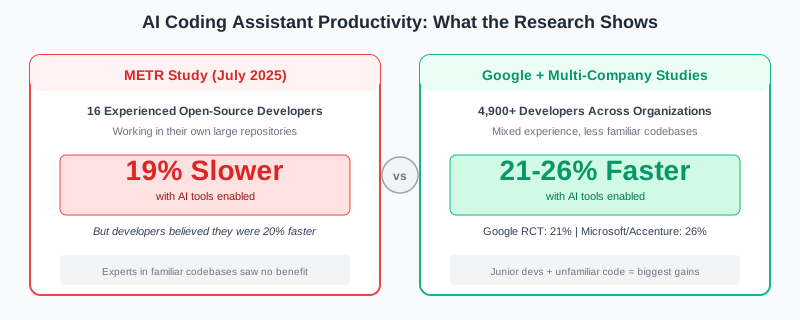
A July 2025 randomized controlled trial from METR studied 16 experienced open-source developers working on their own large repositories. When AI tools were allowed, developers took 19% longer to complete tasks. They were slower with AI, not faster.
But here's the critical nuance: before starting, developers predicted AI would make them 24% faster. After completing tasks, even with the 19% slowdown, they still believed they had been 20% faster.
AI coding feels fast. The dopamine hit of code appearing on screen as you type creates a sense of momentum that doesn't always translate to actual velocity. The early speed gains often disappear into cycles of editing, testing, and reworking.
Contrast this with other studies. Google's internal RCT found developers completed tasks 21% faster with AI. A multi-company study across Microsoft, Accenture, and a Fortune 100 firm found a 26% productivity increase. The key difference? The METR study focused on experienced developers working in codebases they already knew deeply. The other studies included more junior developers and less familiar codebases.
The Experience Paradox
This is where it gets interesting. A Fastly survey of 791 developers found that senior developers (10+ years experience) are more than twice as likely as junior developers to have over half their shipped code be AI-generated: 32% versus 13%.
But senior developers also spend more time correcting AI output. Nearly 30% of seniors reported editing AI-generated code enough to offset most of the time savings, compared to 17% of juniors.
The explanation is straightforward: senior developers are better equipped to catch AI's mistakes. They have the experience to recognize when code "looks right" but isn't. That makes them more confident using AI aggressively, but it also means they invest more in verification.
For junior developers who don't understand cloud infrastructure, CI/CD pipelines, or software architecture, AI assistants can create larger messes than writing code slowly themselves. There's simply too much that can go wrong, and if they can't guide the assistant appropriately, they compound problems rather than solving them.
The Delegation Problem
Here's what I've observed repeatedly: many data scientists don't know how to delegate tasks, even to humans. They're essentially micromanagers who need to understand every decision before they can accept it.
AI coding assistants require delegation skills. You need to break work into discrete chunks, describe what you want at the right level of abstraction, and trust the output enough to evaluate it rather than rewrite it. If you can't do this with a junior developer, you won't be able to do it with an AI assistant either.
The data scientists who struggle most are the ones who blindly start projects without designing a framework for how the solution should work. This approach was always inefficient with human-written code. With AI-generated code, it's catastrophic. You end up with a tangled mess of suggestions that don't cohere into a system.
Why Teams Resist (And How to Overcome It)
I've noticed a lot of hesitation from data scientists and software engineers to fully embrace coding assistants. I think understanding the psychology behind this resistance helps address the issue. Thiago Avelino's analysis of developer resistance provides excellent data on this phenomenon. What follows is my deeper dive into the foundational psychology driving these patterns.
The Legacy of Disappointment
Many experienced developers tried earlier iterations of these tools and found them wanting. The autocomplete suggestions were basic. The context understanding was poor. The code quality was inconsistent at best.
That experience is carrying into 2025, even though the tools are dramatically better. Claude Code today is a different category of tool than GitHub Copilot was in 2022. But once someone labels a technology as "not ready," they rarely revisit that judgment unprompted. Developer forums are full of complaints about early AI tools that no longer reflect the current state of the technology.
What's happening here is a phenomenon psychoanalysts call repetition compulsion, the unconscious tendency to repeat past experiences, even negative ones, because they're familiar. Freud observed that people seek comfort in what they know, even when what they know is painful or limiting. An engineer who was burned by early AI tools develops a pattern: encounter AI tool, expect disappointment, experience disappointment (often through self-fulfilling prophecy), confirm belief that AI tools don't work.
Breaking this cycle requires recognizing that the familiar isn't always correct. The tools have changed fundamentally, but the psychological pattern persists because the brain finds safety in established judgments. Overcoming this requires deliberate exposure to the new reality, not rational argument about how things have improved.
The Trust Fallacy
The most common objection I hear is that engineers don't "trust" the assistant to code correctly. But this fundamentally misunderstands how software development works.
We've never trusted any code unconditionally. That's what code reviews are for. That's what tests are for. That's what QA processes exist to catch. The solution to "AI might write buggy code" is the same solution we've always had for "humans might write buggy code": verification and testing.
If your development process can't catch bugs in AI-generated code, it can't catch bugs in human-generated code either. The problem isn't the AI; it's your process.
The deeper issue is that trust is fundamentally about vulnerability. Mayer, Davis, and Schoorman's foundational research on organizational trust defines it as "the willingness to be vulnerable to the actions of another party." Trust requires accepting that someone else might fail you, and that's threatening.
Their model identifies three components of trustworthiness: ability (can they do the job?), benevolence (do they have my interests at heart?), and integrity (are they consistent and honest?). AI assistants clearly have ability. They lack benevolence in any meaningful sense because they're tools, not allies. And their integrity is probabilistic rather than principled.
When engineers say they don't "trust" AI, they're often expressing discomfort with this vulnerability in a context where the usual trust-building signals are absent. There's no relationship to fall back on. No track record of reliability. Just output to evaluate. The solution isn't to make AI more trustworthy. It's to recognize that trust in this context means trusting your own verification process, not trusting the tool.
The Control Illusion
Some engineers want to understand every micro-decision the model makes and why. This is the delegation problem in another form. They've never learned to work through others, to specify what they want, evaluate the output, and iterate until it's right.
Psychologist Ellen Langer's research on the "illusion of control" explains why this is so seductive. Her 1975 experiments demonstrated that people systematically overestimate their ability to influence outcomes, especially when "skill cues" are present: things like personal involvement, choice, and familiarity. Writing code manually feels controllable. The keystrokes map to outputs. You can trace every decision.
AI-generated code breaks this illusion. The mapping from prompt to output is opaque. You can't trace the reasoning. And that lack of transparency triggers anxiety in people who've built their professional identity around precise control over technical details.
The paradox is that the illusion of control often impairs actual outcomes. Research on micromanagement consistently shows that managers who insist on controlling every detail produce worse results than those who delegate effectively. The same dynamic applies here: engineers who insist on understanding every AI decision often produce worse code than those who focus on specifying intent and evaluating results.
Individual contributors who can't delegate will struggle with AI assistants the same way they'd struggle managing a team. The skill gap isn't technical; it's managerial.
Self-Sabotage
I've seen a pattern that's uncomfortable to name but important to acknowledge: deliberate self-sabotage.
Users who aren't comfortable with AI assistants sometimes don't try hard to get good results. They use vague prompts, reject reasonable outputs, and then declare "I tried to use it and it doesn't work." This allows them to feel validated in their resistance while appearing to have made a good-faith effort.
This behavior makes psychological sense when you understand self-sabotage as a defense mechanism rather than a character flaw. Psychodynamic theory suggests that self-defeating behaviors often function as protection against perceived threats. By ensuring the tool doesn't work, the engineer protects themselves from what successful adoption might mean.
The threat is identity-based. Organizational psychologists call this "professional identity threat," when workplace changes undermine the roles that make people feel legitimate and useful. For many engineers, coding skill is the foundation of their professional identity. It's what makes them valuable. It's what they've spent years developing.
When a tool threatens to commoditize that skill, the brain responds defensively. This isn't conscious sabotage in most cases. It's the same unconscious process that leads people to stay in familiar-but-unhealthy patterns rather than risk the unknown. The chaos you know feels safer than the possibility you might not be needed.
Almost half of developers (49%) report fearing that automation will replace their role within five years. Rather than viewing the tool as an advantage that allows them to build greater things, they view it as a threat to be neutralized. The self-sabotage is a defense mechanism, proof that they're still needed, that the human element can't be automated away.
Overcoming this requires reframing what "being needed" means. The engineers who thrive with AI assistants are those who've shifted their identity from "I write code" to "I solve problems." Code is just one tool in that toolkit. AI is another. Neither threatens the core value proposition of someone who understands the problem deeply enough to know what to build.
Organizations overcome this by reframing the narrative. AI assistants don't replace individual contributors; they elevate them. The goal isn't to automate the job away but to free up cognitive capacity for the harder problems that AI can't solve. Teams that successfully adopt AI tools are the ones where leadership consistently reinforces this message and models the behavior themselves.
Prompting Strategies That Work
How you interact with the coding assistant matters enormously. I see two consistent failure patterns, and one approach that works well.
What Doesn't Work
Pattern 1: The Vague Prompt
Write a function to process the data.
This prompt assumes the model knows what data you're talking about, what "process" means in your context, what format you want the output in, and how this function fits into your larger system. It knows none of these things. The output will be a generic placeholder that requires substantial rework.
Here's a slightly better but still problematic version:
Write a Python function that takes customer data and calculates churn risk.
Better, but still vague. What format is the customer data in? What features indicate churn risk? What should the output look like? A score? A category? A probability? The model will make assumptions for all of these, and they probably won't match yours.
Pattern 2: The Robotic Specification
Some developers swing too far in the other direction. They write prompts like they're writing specification documents:
REQUIREMENTS:
1. Create function named calculate_churn_risk
2. Input: pandas DataFrame with columns [customer_id, tenure_months,
   monthly_charges, total_charges, contract_type, payment_method]
3. Output: DataFrame with customer_id and churn_probability (float 0-1)
4. Use logistic regression
5. Handle missing values with mean imputation
6. Include docstring
7. Add type hints
8. Raise ValueError for invalid inputs

CONSTRAINTS:
- Must be compatible with Python 3.9+
- Must not exceed 50 lines
- Must follow PEP 8
This is holdover behavior from early "prompt engineering" advice that treated LLMs as input-output machines requiring precise instructions. The prompt is technically complete, but it's missing context. Why logistic regression? Why these specific columns? What's this function being used for? Without understanding the purpose, the model can't make intelligent tradeoffs or suggest improvements.
What Works: Treat It Like a Colleague
The most effective approach is to speak to the coding assistant as if it were a junior developer joining your team. A real junior developer would want to know: What problem are we solving? Why is it worth solving? Who will use this? How does it fit into the existing system? What constraints should I be aware of?
Here's the same request, rewritten as a conversation with a colleague:
I'm building an early warning system for customer churn at a B2B SaaS company.
Our customer success team needs to know which accounts are at risk so they can
intervene before the customer decides to leave.

Here's the context:
- We have about 2,000 enterprise customers
- Our data team has already built a feature table with engagement metrics
  (logins, feature usage, support tickets) and account attributes (tenure,
  contract value, industry)
- The output needs to feed into a Salesforce dashboard that the CS team
  checks daily
- We care more about catching true churners (recall) than being precisely
  right (precision), because a false alarm just means an extra check-in call

I'm thinking we start with a simple logistic regression as a baseline before
trying anything fancier. The feature table is in a pandas DataFrame.

Can you help me design a function that:
1. Takes the feature DataFrame and returns churn probabilities
2. Is structured so we can easily swap in a different model later
3. Includes some basic validation so it fails fast if the data looks wrong

Before you write code, can you review this approach and flag anything I might
be missing? I'm especially uncertain about how to handle the class imbalance
(only ~5% of customers actually churn).
This prompt gives the model everything it needs to be genuinely helpful:
- Business context: B2B SaaS, customer success use case, Salesforce integration
- Technical context: 2,000 customers, existing feature table, pandas DataFrame
- Success criteria: Optimize for recall over precision
- Design intent: Start simple, make it swappable
- Explicit uncertainty: Class imbalance concern
The model can now make intelligent suggestions. It might recommend SMOTE for the class imbalance. It might suggest a probability calibration step since the output feeds a dashboard. It might point out that "swappable models" suggests a class-based design with a predict interface. You will find that the quality of the output from the model is much better with this approach.
The CLAUDE.md File
Claude Code uses a CLAUDE.md file in the root of each project to maintain alignment between sessions. This is incredibly important and consistently underused.
Everything the assistant should know about your project, coding styles, modularization requirements, and architectural decisions belongs in this file. Without it, every session starts from scratch. With it, the assistant maintains context like a team member who's been on the project for months.
Here's an example:
# Project: Customer Churn Prediction Pipeline

## Overview
ML pipeline for predicting enterprise customer churn. Integrates with Salesforce for CRM data, deployed as Azure Functions, trained on Databricks. The output feeds a customer success dashboard where CSMs review at-risk accounts weekly.

## Architecture
- src/ contains installable package code (pip install -e .)
- apps/ contains entry points (inference, training, API)
- tests/ contains pytest test files (mirror src/ structure)
- configs/ contains YAML configuration files
- All business logic goes in src/, never in apps/
- Entry points in apps/ should be thin wrappers that call src/ modules

## Tech Stack
- Python 3.11
- pandas for data manipulation (not polars)
- scikit-learn for modeling (not pytorch for this project)
- pytest for testing, pytest-cov for coverage
- Azure Functions for deployment
- Databricks for training jobs

## Coding Standards
- Type hints required on all function signatures
- Docstrings in Google format
- No global variables or module-level state
- Config via YAML files in configs/, never hardcoded values
- All database queries go through the data_access module
- Logging via structlog, not print statements

## Testing Requirements
- Unit tests required for all src/ modules
- Integration tests for apps/ entry points
- Minimum 80% coverage for new code
- Use fixtures in conftest.py, don't repeat setup

## Key Domain Context
- "Churn" = no login for 30+ days AND no contract renewal within window
- Enterprise customers have 5+ seats
- We optimize for recall over precision (false negatives are costly)
- Customer health scores range 0-100, below 40 triggers outreach

## Things to Avoid
- Don't use print() for logging
- Don't put business logic in apps/
- Don't hardcode connection strings or API keys
- Don't create new config patterns, use existing ConfigLoader class
- Don't use pandas inplace=True (causes subtle bugs)

## Current Sprint Focus
Building the feature engineering module. Priority is time-series aggregation of usage patterns over 7, 30, and 90 day windows.
Why This Works
The CLAUDE.md file solves a fundamental problem with AI assistants: they start every session with amnesia. Without explicit context, the model will make reasonable guesses that may conflict with your actual project. It might suggest PyTorch when you use scikit-learn. It might put logic in the wrong directory. It might use a logging pattern that doesn't match your codebase.
Each correction wastes time and creates friction. Worse, corrections mid-conversation often get partially applied, leaving you with inconsistent code that follows some conventions but not others.
The CLAUDE.md file front-loads this context. It's the equivalent of the onboarding document you'd give a new team member: here's how we do things, here's what to avoid, here's the current priority. The model reads this file at the start of every session and uses it to inform all subsequent suggestions.
The "Things to Avoid" section is particularly valuable. Models will default to common patterns from their training data. If those patterns conflict with your project's conventions, you'll spend time correcting rather than building. Explicitly listing anti-patterns prevents this.
Update this file as your project evolves. When you establish a new pattern or make an architectural decision, add it. When you finish a sprint focus, update it to the next priority. Treat it as living documentation that keeps your AI teammate aligned with where the project actually is, not where it was when you started.
Common Anti-Patterns to Avoid
Beyond vague and robotic prompts, here are specific patterns that consistently produce poor results:
The Copy-Paste Dump:
Here's my code, it's not working, fix it:

[500 lines of code]
This overwhelms the context and gives the model no information about what "not working" means. Instead, isolate the problematic section and describe the expected vs. actual behavior.
The Moving Target:
Write a function to calculate customer lifetime value.

Actually, make it a class.

Actually, can you add a method for predicted future value too?

Actually, let's use a different formula for the calculation.
Each message invalidates the previous work. Instead, think through what you want before starting, or explicitly frame it as exploration: "I'm not sure of the best approach here. Let's start with X and iterate."
The Invisible Constraint:
Write a data pipeline to process our event logs.

[Model produces a Spark solution]

We can't use Spark, we don't have a cluster.

[Model produces a Dask solution]

We can't install new dependencies, IT won't approve them.
State your constraints upfront. The model can't read your mind about what's allowed in your environment.
When the Model Gets Lazy
There's a failure mode that doesn't get discussed enough: the model giving up on elegant solutions and hacking its way out of problems.
You'll see this when debugging gets hard. The model tries a fix, it doesn't work, it tries another. By the third or fourth iteration, something changes. Instead of stepping back to understand the root cause, it starts proposing ugly workarounds: a try-except that swallows the error, duplicated code rather than fixing the abstraction, a flag variable that patches the symptom without addressing the cause. The behavior resembles a tired junior developer at 2am who just wants to close the ticket and go home.
This isn't anthropomorphization. It's reward hacking, a well-documented phenomenon in RLHF-trained models. The model optimizes for completion, not elegance. Its training rewards producing an answer, and after failed attempts, the probability distribution shifts toward anything that works rather than what should work. Research shows this manifests as length bias, sycophancy, and shortcut-seeking behavior.
The problem compounds in long conversations. The "lost in the middle" phenomenon means models struggle to recall information from the middle of their context window. Performance degrades significantly past 24K tokens, even in models advertising 200K context. What feels like the model "getting tired" is actually context rot: declining ability to recall and reason over accumulated information.
In agentic modes, this gets worse. The model may skip reading entire files to save tokens, creating new utilities that duplicate existing ones. I've watched Claude create helper functions that already existed in a module it didn't bother to read.
Senior developers recognize these patterns immediately. They've seen the same behavior from human developers: the hardcoded value that should be a config parameter, the duplicated logic that should extend a base class, the special-case flag that makes tests pass but creates a maintenance nightmare. Juniors often miss these warning signs because the code works and the tests pass. This is one reason productivity gains from AI assistants are so uneven across experience levels.
The fix is active supervision. When debugging gets stuck, don't let the model keep iterating. Ask it to explain its theory of the root cause before proposing another fix. If it can't articulate one, it's just guessing.
Add explicit guardrails to your CLAUDE.md: "Always read the complete file before making edits. Never create new utility files without first checking existing modules. When debugging, explain your theory of the root cause before proposing fixes."
The Error Correction Loop
Even with perfect prompting, AI assistants make errors. The key insight is that this iteration is massively faster than the same process with human developers.
When an AI writes code that doesn't work, you provide feedback, and it corrects. What's actually happening is alignment. The model is learning your actual intentions, which were probably less specific than you realized. The errors mostly stem from miscommunication, not from model hallucination.
This correction loop happens in minutes or hours. The same loop with a junior developer happens over days or weeks of meetings, code reviews, and back-and-forth. You're getting the same iteration, compressed into a fraction of the time.
Yes, you still need to catch errors. Yes, you still need to review code carefully. But the time from "I have an idea" to "I have working code" shrinks dramatically when you embrace this iterative process rather than expecting perfect output on the first try.
Elevating Your Team's Operating Level
The real opportunity with AI coding assistants isn't doing the same work faster. It's doing different work entirely.
When routine coding becomes cheap, the constraint on your team shifts. The bottleneck is no longer "how fast can we write code?" It's "do we understand the problem well enough to specify a good solution?" and "can we design systems that are maintainable and extensible?"
These are the skills that separate senior contributors from junior ones. And they're precisely the skills that AI assistants can't replicate.
Sebastian Raschka offers a useful analogy: chess. Chess engines surpassed human players decades ago, yet professional chess played by humans is still active and thriving—arguably richer and more interesting than ever. Modern players use AI to explore different ideas, challenge their intuitions, and analyze mistakes with a level of depth that simply wasn't possible before. But they haven't outsourced the thinking. They've elevated it.
This is the model for how to think about AI in intellectual work. Used well, AI accelerates learning and expands what a single person can reasonably take on. It's a partner, not a replacement. But if AI is used to outsource thinking entirely, it risks undermining motivation and long-term skill development.
What to Focus On
Get individual contributors operating at a higher altitude. Instead of writing CRUD endpoints, have them design data contracts and API schemas. Instead of implementing features, have them specify acceptance criteria and edge cases. Instead of debugging, have them write comprehensive test suites that make debugging unnecessary.
Build systems that are highly configurable and easy to maintain. When AI writes the implementation, you can invest the saved time in architecture. The fancier approach that was always "too expensive to consider" is now within reach.
Align more deeply with stakeholders. The limiting factor on most data science projects isn't engineering capacity. It's understanding what the business actually needs. Use the time you save on coding to have more conversations, run more experiments, and validate more assumptions.
The Bottom Line
AI coding assistants work. They're not hype. But they require genuine investment to use effectively.
You need to choose vendors strategically, with an eye toward market dynamics and long-term viability. You need to understand that productivity gains vary dramatically based on experience level and codebase familiarity. You need to address the psychological resistance that keeps skilled developers from fully adopting these tools. You need to develop prompting skills that treat the assistant as a collaborator rather than a command-line interface. And you need to recalibrate what you expect from your team when the constraint shifts from coding speed to problem understanding.
The teams that figure this out gain genuine competitive advantage. They ship faster, with better quality, and can tackle problems that were previously too expensive to consider. The teams that don't will find themselves increasingly unable to compete for talent and velocity.
We're still early. These tools will get better. The developers who learn to use them effectively now are building skills that will compound for years.
How is your team approaching AI coding assistants? What patterns have you found that work or fail? I'd like to hear your experience in the comments.